


CardSpot
A command center for your card, right on your phone, so you can worry less and live more.
The freedom to live life on your terms starts with having control over your cards. With CardSpot, you can do it all, from setting spending limits and curbing impulse purchases to instantly freezing misplaced cards. Manage your cards safely and conveniently, anytime, anywhere. Our mobile banking app puts the power at your fingertips. With CardSpot, you're not just managing your cards; you're taking control of your future.
Simple, streamlined card management.
Map out every purchase
Clearly see your purchases on a map—right from within our mobile banking app. Easily recognize purchases with clear merchant names, business hours, and locations to resolve any issues quickly.
Keep a closer eye on everything
See exactly where your card is stored online. You'll never be surprised by that monthly charge again.
Don’t let anything get past you
Real-time alerts keep you informed with notifications about card purchases. So, when a charge comes through, you’ll always know.
Turn your card off and on
You have the power to immediately turn your card off right from your phone. Turn it back on whenever you're ready.
Use your card with ease
Add your card to your mobile wallet—like Apple Pay or Google Pay—in just a few taps and start using your card instantly.
24-hour self-service, even when your branch is closed
No more waiting for your branch to open, going to the bank or dealing with calls to customer service. Set travel plans and more, in the moments that really matter. Now you have total control anytime, anywhere.
How to Access CardSpot
-
Mobile Instructions
- Login to the Stock Yards Bank & Trust Mobile App as you normally would.
- Tap menu at the bottom right of the screen (example below).
![CardSpot Mobile Banking Bottom Menu]()
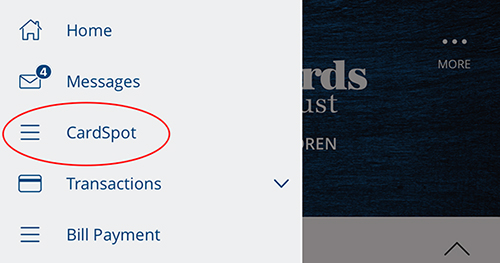
- Tap CardSpot when the left side menu opens (example below).
![CardSpot Mobile Banking Left Side Menu]()
- Agree to the Terms and Conditions, and then you will be directed to your CardSpot hub. It's that easy!
- Have questions? Contact us at (800) 625-9066, onlinecustomerservice@syb.com, or send us a message.
-
Desktop Instructions
- Login to Stock Yards Bank & Trust Online Banking from your desktop computer as you normally would.
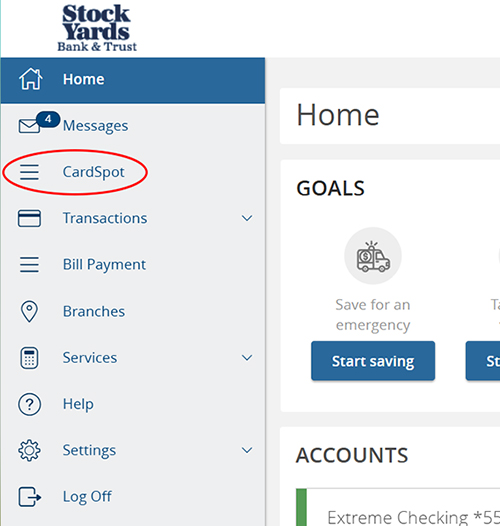
- Click CardSpot on the left-side menu (example below).
![CardSpot Online Banking Left Side Menu]()
- Agree to the Terms and Conditions, and then you will be directed to your CardSpot hub. It's that easy!
- Have questions? Contact us at (800) 625-9066, onlinecustomerservice@syb.com, or send us a message.

Don't have our mobile banking app yet? Download it today to access CardSpot:


Questions? Contact Us!
Data charges may apply. Check with your mobile phone carrier for details. App Store is a service mark of Apple Inc. Apple and the Apple logo are trademarks of Apple Inc., registered in the U.S. and other countries. Android, Google Play and the Google Play logo are trademarks of Google Inc.
Terms and conditions apply.